
Nodes
Nodes are the building blocks of your system. They can represent APIs, websites, applications, resources, tests, etc. Nodes can represent anything that you want to keep track of and audit! Each node has a unique ID, a name and optional description, version, status, zero to any amount of children, metadata, and stamp.
Changes to nodes, that is when they’re added, removed, and updated, are kept track of in revisions. By building a tree of nodes, you can represent anything from a simple system to complex enterprise solutions. For example, imagine the following node structure:
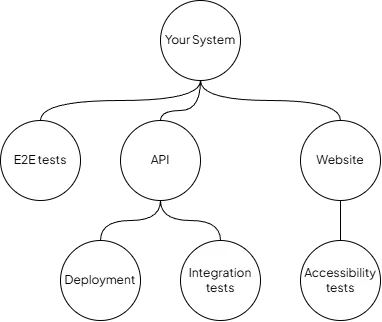
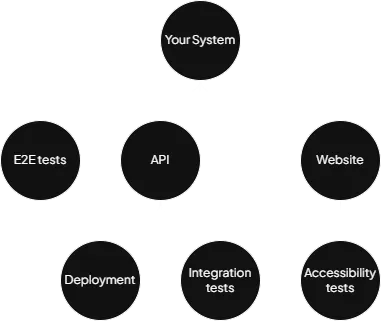
Nodes representing a simple system
Constellation will help revision your system and keep track of versions and statuses. For example, if your Accessibility tests fail you may want to highlight that the website can no longer be considered stable or acceptable for the current release. Another example are your E2E tests which probably run outside deployments on a schedule (e.g. every night). Whenever E2E tests fail you probably want to highlight that the current release of Your System is not working correctly.
All revisions (and thus a Constellation) must always contain a root node. All nodes other than the root node itself are always descendants of the root node; but not always children.
Each node has a unique ID, with the value part matching regex ^root$|^[0-9a-f]{8}$ and the optional variant part
matching regex ^[^:]{1,100}$. Note that aside from root, all IDs are in hexadecimal format. Some example IDs are:
The root node, which must always exist in a revision (and Constellation).
00000000
Section titled “00000000”Same as root, just in a longer format.
12345678
Section titled “12345678”A “random” ID often used in examples, but still perfectly legal.
ffffffff
Section titled “ffffffff”The final ID in a sequence of all IDs in sorted order.
Variants
Section titled “Variants”All nodes (excluding the root node) can also be varianted (reflected in their ID). The IDs of varianted nodes contain
the : character followed by a string of text. For example: 12345678:foo is a node with the ID value 12345678 and
the ID variant foo. Read more here.
Name and Description
Section titled “Name and Description”Use the name field to make a node easily identifiable. In a larger Constellation in may be beneficial to give your nodes more descriptive names. For example, try to avoid generic terms such as API, Tests, or App. Instead, try Account API, E2E Tests, and Frontend App. Names can contain a maximum of 255 characters, or when encoded in UTF8, a maximum of 255 bytes. This means that in some languages you may have less than 255 characters to play with. However, if you keep hitting the maximum name length you may need to rethink what the node should be named.
The description field can be used to give a quick overview of what the node represents. For example, a E2E Tests node may have a description like Tests login, sign up, and dashboard. Adding links to repositories or other resources may also be a good idea. The description field also has the same length/byte limitation as the name field has.
Version
Section titled “Version”Each node has a version (value and schema). The schema determines the type of version (e.g. SemVer or Incremental)
and the value is the actual version value (e.g. 1.2.3 or 123) Bumping a node’s version will propagate the version
change to the node’s ancestors (direct parent, parent’s parent, etc.). For example, imagine the following Constellation:
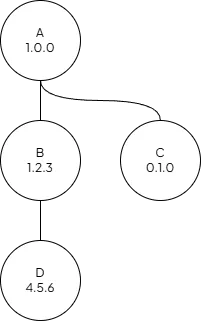
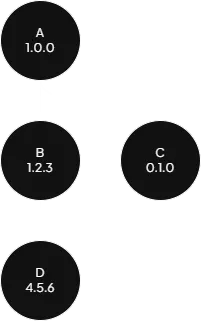
Constellation with nodes and versions
Bumping node D to 4.6.0 will automatically bump node B to 1.3.0 and node A to 1.1.0. Node C will remain
unchanged because it’s not an ancestors to node D. Read more about versions here.
Status
Section titled “Status”Each node has a status (result and strategy.) The strategy determines how the result is calculated (e.g. Manual or
All Success) and the result is the result of the calculation (e.g. Success or Failure). Status changes are
propagated to the node’s ancestors (direct parent, parent’s parent, etc.). For example, imagine the following
Constellation:
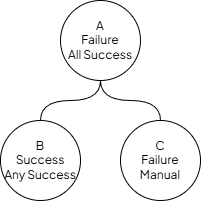
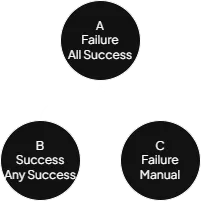
Constellation with nodes and statuses
Changing the status of node C to Success will also change the status of node A to Success now that node A’s
status strategy (All Success) results in Success when calculated. Read more about statuses
here.
Children
Section titled “Children”A node can have zero to many children (0..*). Depending on the node’s version schema and status strategy, certain tree configurations may not be legal. For example, a node with the Manual status strategy can’t have any children and must have its status strategy changed to anything other than Manual (e.g. All Success) before it can have children. Each node can only have one parent.
Metadata
Section titled “Metadata”Each node has a key-value store of metadata. Each node can have a maximum of 100 metadata entries. Each entry has a key and a value, with the key being between 1 and 100 characters/bytes long and the value being a maximum of 255 bytes long. Each metadata entry value can be one of the following types:
| Type | Constraints | Examples |
|---|---|---|
| Bool | N/A | false, true |
| Int | 32-bit integer | 0, 123, -2147483648, 2147483647 |
| Float | 32-bit single-precision (IEC 60559) | 0, 123.5, -3.4028235E+38, 3.4028235E+38 |
| String | Maximum 255 bytes in UTF8 encoding | (empty), foo, bar |
The following table represents example metadata of a hypothetical node:
| Key | Type | Value |
|---|---|---|
position.x | Float | -10.0 |
position.y | Float | 12.5 |
Each node also has a stamp, like the one found in revisions. Read more about that here. When a node is added or updated in a revision, it gets the same stamp as the revision itself; unless it’s explicitly given a different stamp by the user. This way you can keep track of when, by whom, and why nodes are changed across revisions.